In this article we will share how MyField myfield.one evolved from a concrete application into a reusable identity and sync infrastructure layer.
The main thread has three parts:
- Start from Turn Field, and focus on the identity and sync problems every serious local-first app eventually meets.
- Use MFID, Keychain, and end-to-end encrypted sync to move data ownership back to the user.
- Turn these capabilities into SDKs and APIs so more applications can reuse them directly.
Starting from Turn Field
Turn Field is a local-first read-later app.
Turn Field: https://turn.myfield.one
Saving webpages, organizing topics, reading, search, and app state all happen locally first. It should keep working even without an account or a network connection.
But a real personal app cannot stop at local storage. It also needs multi-device use, recovery after device loss, and avoid sending private content to a platform by default.
So Turn Field looks like a read-later app on the surface, but it exposed the infrastructure gap behind local-first applications.
The Two Things Local-First Apps Still Need
If a local-first app is going to become a long-lived product, it quickly runs into two deeper problems.
The first is identity:
- Who is the user?
- Who creates the identity, and who can prove it?
- How does the identity continue after a device change?
- Can identity itself also be local-first and decentralized?
The second is sync:
- How should user data sync across devices?
- Should it use a P2P network or a cloud relay?
- Can the cloud only handle ciphertext?
- When two devices modify the same data, how should the app merge the changes and handle conflicts?
These are the two problems MyField is designed to solve: give local-first apps reusable identity and sync infrastructure without sacrificing the user’s control over private data.
The Problem with Current Identity Models
In most applications, identity is still a platform account: the platform assigns the account identifier, stores the authentication method, decides who can log in, and usually becomes the center of authorization.
That may be a reasonable tradeoff for ordinary online services, but it creates several problems for local-first apps:
- The root authority of identity sits with the platform, not the user.
- Device replacement and account recovery depend on platform flows.
- Different apps often see the same platform account, which creates natural cross-app correlation.
- Login, authorization, and application data access are easily collapsed into the same account boundary.
In other words, plaintext data can be local-first, while the root of identity is still cloud-first.
MyField tries to push the local-first principle into the identity layer as well.
MFID: Device-Owned Identity
The goal of MFID is to make identity owned by the user’s devices first, rather than assigned by a platform.
DID Documents provide a way to represent decentralized identity. MFID narrows that model down to two core design choices:
- The ID is derived from the public key of the first owner key.
- A proof chain lets owner keys rotate, while making every step independently verifiable.
The first point answers “who originally owned this ID.” If the ID is not bound to the initial public key, then a platform or public chain is needed to prove ownership. That external system effectively becomes the new authority.
The second point answers “how identity continues.” From MFID creation to adding keys, rotating keys, and updating identity state, each step can be verified through the proof chain without treating the platform as the final trust root.
MFID x Passkey
In the current implementation, MyField uses Passkey / WebAuthn by default as the device key mechanism for normal users.
Users do not need to remember a password or create a traditional username/password account first. The device creates a key, the key proves the identity, and the identity then enters the later authorization and sync flows.
MFID: https://github.com/myfield-one/mfid
This creates an important shift: identity is no longer just “my account on a platform.” It is closer to “the identity I own on my own devices, plus the continuity relationship between those keys and devices.”
MFID -> Keychain
MFID only solves identity control and authentication continuity. It does not directly carry the encryption keys for the user’s private data.
Authentication answers: who can act for this MFID and approve updates?
Data encryption answers: which devices can decrypt the user’s private data?
The two are related, but they should not be fused into one object. MFID stays small and verifiable. Keychain focuses on local keys, recovery material, app authorization, and encrypted envelopes.
Passkey is a useful example. Passkey handles authentication and signing. The PRF extension can help derive local wrapping material. The actual data encryption, bucket-key wrapping, and future encryption-scheme upgrades live in the Keychain / auth / app data layer.
Keychain management: https://myfield.one/home
What Is Inside MyField Keychain
MyField Keychain is not a normal login-session cache.
It stores or references the core material a user device needs to understand, recover, and control a MyField space:
- owner key / device key records available on the current device;
- DID document and proof chain;
- authorization records and grants;
- encrypted envelopes for cross-device recovery and sync.
The cloud can store an encrypted keychain artifact to help different devices exchange and sync ciphertext material. But decrypting and using that material can only happen on the user’s own device, and the key authorization/update material must also be bound to the user’s key proof, so the cloud or a third party cannot forge or replace it.
Key / Device / Cloud / App Scope
The MyField identity and authorization model can be roughly understood as a set of scopes:
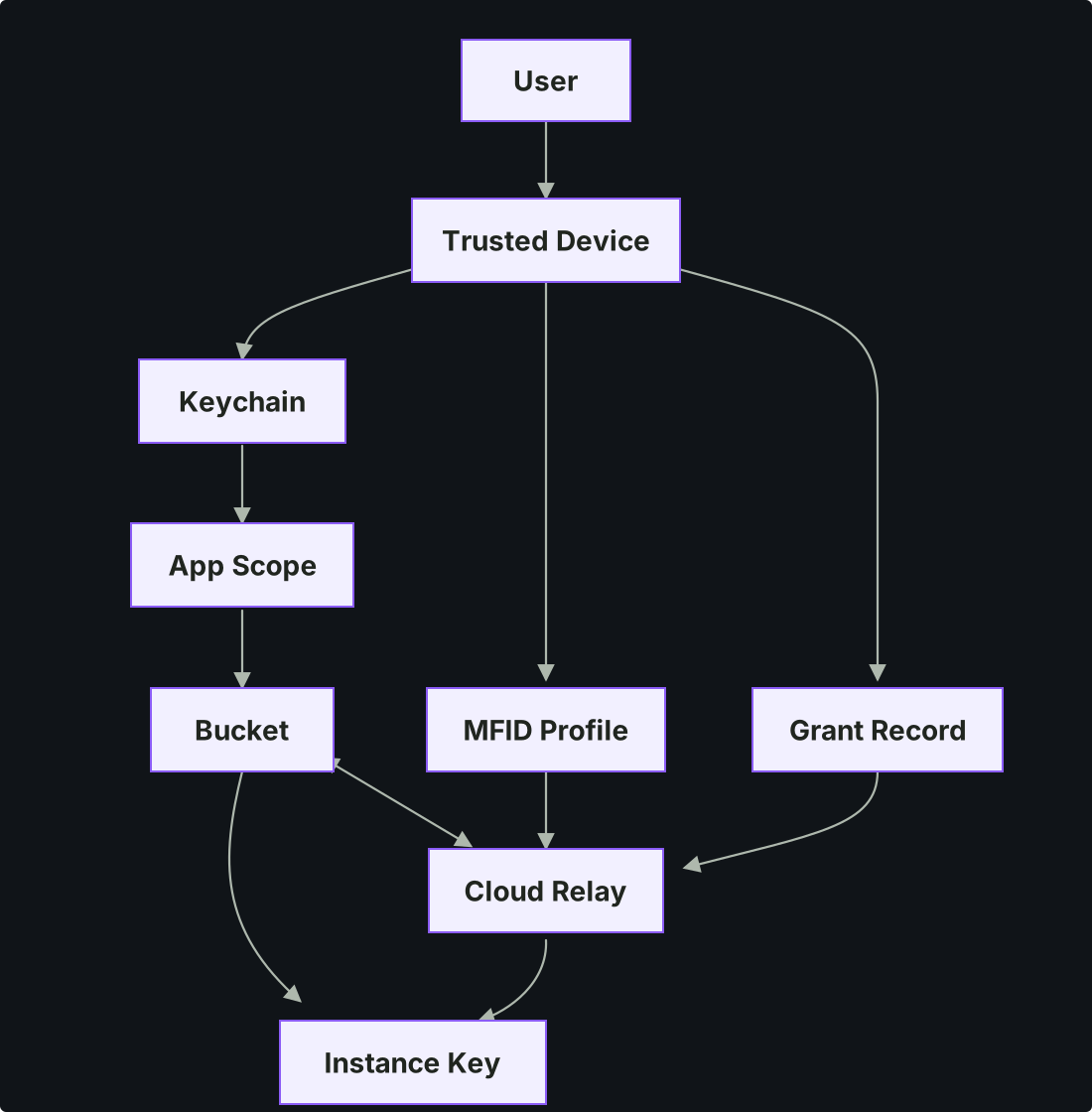
The important thing is the boundaries:
- Device is the root. The user holds identity-control capability through trusted devices.
- MFID represents the owner-key set and its continuous update history.
- Keychain stores local state and encrypted material.
- Grant Record records the limited authorization granted to an app.
- App Scope isolates different applications.
- Bucket is the basic unit of app data sync.
- Instance Key gives a concrete app instance its own encryption and sync capability.
- Cloud Relay stores and forwards profiles, grants, keychain artifacts, and encrypted objects, but does not become the plaintext owner.
How an App Gets Authorization
For apps, MyField should not expose a complex identity protocol. Apps need a clear authorization entry point:
- The app creates its instance locally.
- The app creates or opens a bucket, and local reads/writes are available immediately, with no account or network required.
- When the user wants sync, the app redirects to
/auth. - The user approves the app in the MyField authorization page with their keychain.
- The app receives an encrypted callback result and gets bucket-level sync authorization.
- On top of local reads/writes, that bucket now also gets end-to-end encrypted sync.
The app receives limited authorization and alias MFID, not the user’s global identity: what the app sees in the authorization result is a pairwise alias for this user under this app, not the MFID itself. Different apps get different aliases and cannot correlate the same user across apps — this is the concrete answer, in MyField, to the cross-app correlation problem mentioned earlier: MFID itself is never used as a public cross-app identifier.
This is what connect() means in the MyField SDK: it is the step where a local-first app crosses from pure local state into the identity and network-sync boundary.
Sync: The Cloud Is a Relay, Not a Plaintext Database
MyField sync is a “pull, verify, absorb” model. A device receives remote state, checks whether it is trusted and mergeable, and then absorbs it into local state.
There is also a basic premise: local storage is the source of truth, while the cloud or a P2P node is an encrypted relay.
The current implementation is a simplified case of decentralized sync: multiple user devices plus one cloud relay.
Data is grouped into object buckets by application. In the current SDK, a bucket can be understood as a local-first, end-to-end encrypted object KV:
- Local CRUD does not require an account or network.
- Cloud-relayed object sync uses CAS-backed sync.
- Object IDs are blinded before they enter the relay network.
- Field-level LWW handles ordinary multi-device object merges.
- More complex apps can plug in custom merge and absorb strategies.
This is not realtime collaboration. It first solves single-user, multi-device, local-first, recoverable sync. Low-latency multi-user collaboration, presence, and room state need a separate realtime collaboration layer.
Reusing the Same Logic in My Card
Turn Field is not the only application using this mechanism.
My Card uses the same kind of authorization and sync logic: the app owns its bucket, the user authorizes it through MyField, app data is stored locally first, and sync happens later through end-to-end encryption.
If only Turn Field used this mechanism, it might still be just an app-local sync implementation. When My Card can reuse the same identity, keychain, bucket, and authorization boundaries, MyField starts to become real infrastructure.
- My Card Web: https://card.myfield.one
- My Card GitHub: https://github.com/myfield-one/card
Turning Internal Mechanisms into SDKs and APIs
If every local-first app had to implement identity, keychains, end-to-end encryption, object sync, authorization callbacks, and conflict resolution by itself, the barrier would be very high.
So MyField needs to turn these mechanisms into SDKs and APIs. The SDK should not require developers to understand every underlying protocol up front. It should provide a simple model:
import { createInstance } from "@myfield/sdk";

const instance = createInstance({ namespace: "notesexample" });
const bucket = instance.createBucket({ id: "notes.example.com" });

await bucket.put("note:1", { title: "Hello", body: "Local first" });
await bucket.connect();
await bucket.sync();
The order matters: the app can run locally first, then choose to connect to MyField. Before connect(), it is already a complete local-first app. After connect(), it receives identity and sync capabilities approved by the user.
- MyField SDK: https://github.com/myfield-one/sdk
Building a Note Example with the SDK
The note example is a minimal validation of the SDK.
Developers should not need to understand DID, proof chains, or key envelopes first. By default, it should feel like an ordinary note app:
- create notes;
- edit notes;
- save locally;
- connect when the user chooses;
- recover and sync across devices.
Under the hood, the SDK handles MFID, MyField Keychain, bucket keys, object encryption, ID blinding, and sync merge.
- Note Example Web: https://example-app-note.myfield.one
- Note Example GitHub: https://github.com/myfield-one/example-app-note
A Few Lessons
- When a decentralized system introduces cloud infrastructure, the cloud should be treated as a relay channel.
- Identity cannot mean only login. It must also answer who owns the identity, which devices can represent it, and what authorization an app receives.
- Identity authentication and private-data encryption can be designed separately. App authorization can also be separated from user-identity authentication.
- Infrastructure only matures after it is reused by multiple applications. Turn Field drove the real requirements, My Card validated the reuse boundary, and the note example validated the SDK experience.
Vision and Next Steps
MyField is not trying to solve sync for just one app. The goal is reusable identity and sync infrastructure for local-first applications: user devices own identity, Keychain manages identity, keys, recovery, and authorization material, apps receive only limited scopes, buckets provide local-first object storage, and the cloud or other network nodes only relay ciphertext.
Next, we plan to keep improving a few areas:
- Turn Field: improve sync and add local AI models.
- Cloud relay: explore near-realtime sync relay service and CRDT sync support.
- Self-hosted / self-managed deployment.
Feedback and discussion are welcome:
- GitHub: https://github.com/myfield-one
- Discord: https://discord.gg/wRkZpurnqw
- Mailing list: https://mailing.myfield.one